Dishire — What Was Implemented in the Prototype
This page summarizes the features that were actually implemented in the Dishire prototype: context-based recommendation types, a multi-step LLM recipe generation flow, profile-based constraints, and the end-to-end UI flow.
1. Core Features (Prototype Summary)
- Defined recommendation types and generated recipes using prompt templates
- Implemented a multi-step LLM pipeline (title → ingredients → tools → step-by-step cooking)
- Injected user profile constraints (diet, allergies, religion) into LLM inputs
- Built an end-to-end prototype with FastAPI backend + React UI
2. Multi-step LLM Recipe Generation
Generating an entire recipe in a single call often increased response time and prompt length. It also made it hard to experiment with combining different GPT model choices for cost control. For these reasons, the Dishire prototype explored splitting the recipe into multiple calls. This was an experiment to understand practical trade-offs rather than claiming that multi-step is always better.
In particular, Step 1 generates only the high-level direction (title and short description), so the user can quickly decide whether the direction fits their preference. If not, the user can re-try early, which can reduce unnecessary generation cost.
Subsequent steps generate details such as ingredients/tools and step-by-step instructions. The prototype did not implement ingredient substitution based on preference history, but it was considered a natural extension (e.g., suggesting substitutes based on repeated user choices).
- Step 1: Title, short description, difficulty, estimated time
- Step 2: Ingredients list, required cooking tools
- Step 3: Step-by-step cooking instructions
- Step 4: How to eat, tips, storage, generative image
The generation flow was implemented as API endpoints in a FastAPI backend. The React UI sends step-wise requests and assembles the final recipe output for display.
3. Context-based Recommendation Flow
In the prototype, the user explicitly selects a recommendation mode (e.g., “standard”, “ingredient-based”), and the corresponding prompt template is executed. This initial structure was designed to test whether situation-aware routing is useful in practice.
The longer-term goal was to automatically choose an appropriate prompt template by analyzing user input text and profile constraints. For example, “I only have mushrooms” could route to ingredient-based prompting, while “I only have 10 minutes” could route to time/difficulty prompting. The prototype did not implement this automatic classification step, but it established the template-level structure needed for that future direction.
Recommendation Modes Implemented in the Prototype
- Standard recommendation — a general prompt template designed to return a stable recipe regardless of context.
- Ingredient-based — a template that focuses on user-provided ingredients to generate plausible dishes.
- Context-based — a template that reflects simple constraints such as time and difficulty (e.g., “under 10 minutes”).
This modular design was an early step toward a pipeline of user intent → routing → prompt selection → recipe generation.
4. User Profile Constraints
Beyond simple context input, Dishire experimented with using user profile constraints to generate more personalized recipes.
- Diet preferences (vegan, low-carb, low-sodium, etc.)
- Allergies (e.g., nut allergy)
- Religious dietary rules (e.g., halal, kosher)
These constraints were embedded into prompt templates so the LLM could consider them during generation.
5. UI Prototype
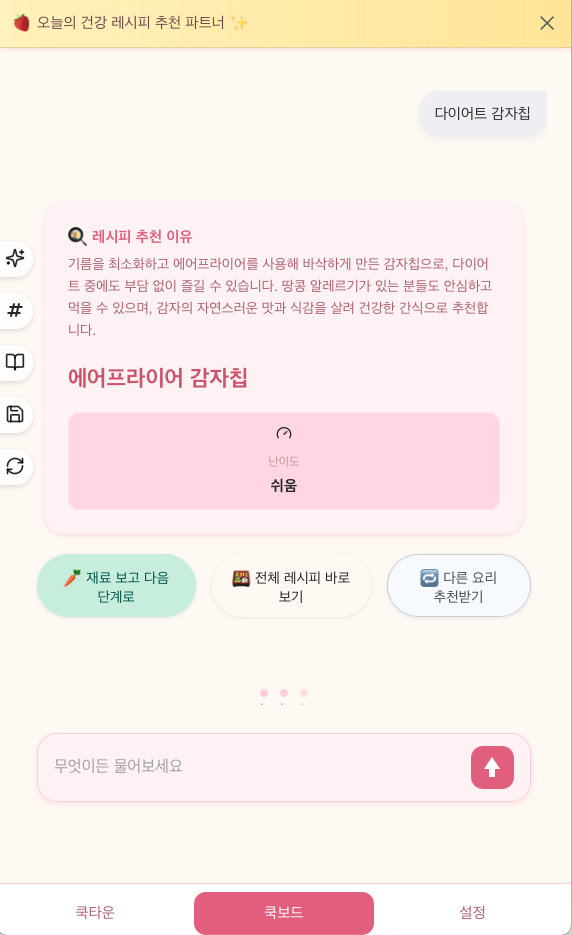
The prototype UI was built with React, supporting a basic end-to-end flow: select a recommendation mode, request a recipe, and review the generated output.